firefox extension

textmarker.pngTextMarker is a great Firefox extension. It allows you to highlight text on web pages and has 3 customizable highlighter colours. Fascinating!!

After installation, to highlight text, just select the text then right click and click on Highlight Text. If you want to remove the highlighting, then just right click on the highlighting and choose Erase this Highlighting.

To change the colour:

1- Click on Tools | Add ons [a list of extensions will open depending on how many extensions you downloaded]

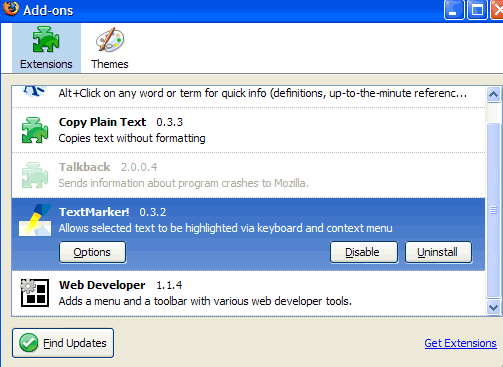
2- Click on the TextMarker extension. It will give you three options:  Disable, Uninstall and Options. Click on Options.

3- Choose the highlight colours that you want.
extensionspanel.gif
As you can see from the image, I have several extensions downloaded. The ‘copy plain text extension’ is excellent for the regular user, and the Web Developer Extension is great if you are  working on CSS or Javascript etc.

phishing test

Here are some phishing stats from SonicWall:

  • 6.1 Billion – Number of phishing e-mails sent world-wide each month
  • $1, 200 – Average loss to each person sucessfully phished (Federal Trade Commission)
  • 15, 451 – Number of unique phishing attacks in January 2006 (Anti-Phishing Working Group)
  • 7, 484 – Number of phishing Web sites found in January 2006 (Anti-Phishing Working Group)

Sonic Wall also puts a very interesting test for your online safety [link]. Try it and see how safe you are. I LOVE that test!!!

200,000 malicious programs in existence

These problem programs can arrive via e-mail, instant messenger, through your internet connection or even your web browser if you visit the wrong website. The threats are so numerous and appear so fast that Windows users must feel under siege. [link]

The majority of the attacks are against Windows users. So how do we stay safe while surfing? The BBC offers a few suggestions:

  • Use anti-spyware and anti-virus programs
  • On at least a weekly basis update anti-virus and spyware products
  • Install a firewall and make sure it is switched on
  • Make sure updates to your operating system are installed
  • Take time to educate yourself and family about the risks
  • Monitor your computer and stay alert to threats

Doesn’t exactly say much, but for starters, this is good advice.

encylopedia of life

eol_logo.pngImagine a digital page for every species on the planet. This is what this newly released digital encyclopedia aims at achieving eventually. It is called the Encyclopedia of Life and it is aiming at being a ‘comprehensive, collaborative, ever-growing, and personalized’ encyclopedia. While the project’s information and objectives and plans have been released, the Encyclopedia itself is not yet functional and its fully functional version is expected by mid 2008.

According to its own stated description, the EOL is:

an ecosystem of websites that makes all key information about life on Earth accessible to anyone, anywhere in the world. Our goal is to create a constantly evolving encyclopedia that lives on the Internet, with contributions from scientists and amateurs alike. To transform the science of biology, and inspire a new generation of scientists, by aggregating all known data about every living species. And ultimately, to increase our collective understanding of life on Earth, and safeguard the richest possible spectrum of biodiversity.

safari going windows

Apple announced that it is releasing a version of Safari for Windows [link]. This, according to the BBC, reignites the ‘browser wars’. It has been suggested by some developers that this might be because of the impending release of the iPhone. It should be noted that like other browsers, Safari ‘earns money for Apple every time a user searches Google via the integrated search button on the browser’s toolbar’ and:

Google pays a share of ad revenue to Apple. According to one report, Firefox’s developer the Mozilla Foundation earned over $50m in search engine ad revenue in 2005, mostly from Google.

The BBC notes that

Up until now, Safari has captured just 5% of the browser market, while Microsoft’s Internet Explorer accounts for 78%, and rival Firefox 15%.